How the Right Family Command Center Can Reduce Your Mental Load
“What time are we leaving?” “Where’s the permission slip?” “Did anyone buy more lunch food?” You may know the answers because you’re the person keeping track. Even when everyone pitches in, the remembering can still belong mostly to you.

A family command center gives household plans somewhere to live outside one person’s head. A calendar, a short action list, and a place for papers can help. But the important question is what happens after the information goes up: Can other people find it, act on it, and keep it current?
Let’s build a setup that your family can actually use, with shared responsibility and enough support to make participation possible.
Begin with the information people keep asking for. Agree where the current plan lives, who updates it and takes the next action, and when you’ll check it together. The examples below can help you work out the details.
What is a family command center?
A family command center is a shared place to find the information and next steps that keep home life moving. It might be a kitchen whiteboard, a calendar beside the door, a shared digital calendar and list, or a combination.
Its job is to help people answer: What’s happening? What needs preparation? What am I responsible for? Where do I begin?
Think of it as a place to coordinate. The laundry instructions can stay by the washer. The toothbrush cue can stay in the bathroom. A central overview can connect routines that happen across several rooms without moving every instruction onto one wall.
How visible plans support executive function
Remembering a departure time while packing lunch and finding a missing shoe asks you to hold and use several pieces of information. Working memory is one part of executive function; planning and problem-solving draw on these mental processes too.
Writing down a plan or setting a reminder is a way of moving some demands into the environment. Researchers call this cognitive offloading. In everyday language, you’re giving the remembering somewhere else to live.
A family command center applies that idea to household coordination. Instead of asking someone to repeat the plan, you have somewhere to look. The next part is learning when to check it and what to do with the information you find.
Our guide to executive function at home explores the skills behind familiar household tasks. For the broader explanation, see Understanding Executive Function.
What should you put in a family command center?
Begin with the information your household repeatedly searches for or asks one person to supply. You do not need every possible section. Choose the combination that serves the routines you’re trying to make easier.
- Plans and departure times: appointments, activities, who is driving, and when preparation needs to begin.
- Next actions: a specific task, the person taking responsibility, and a deadline when there is one.
- Papers needing action: forms to sign or return, with a clear route back out of the holder.
- Shared shopping needs: a list anyone can add to when something runs low.
- Useful preparation: tomorrow’s equipment, a dinner decision, or a change to the usual routine.
Keep completed items and old notices out of the active view. When everything is equally visible, it becomes harder to find what matters now. Our article on working memory and clutter explores how to keep useful reminders from becoming visual noise.
Use the Family Command Center Planning Checklist
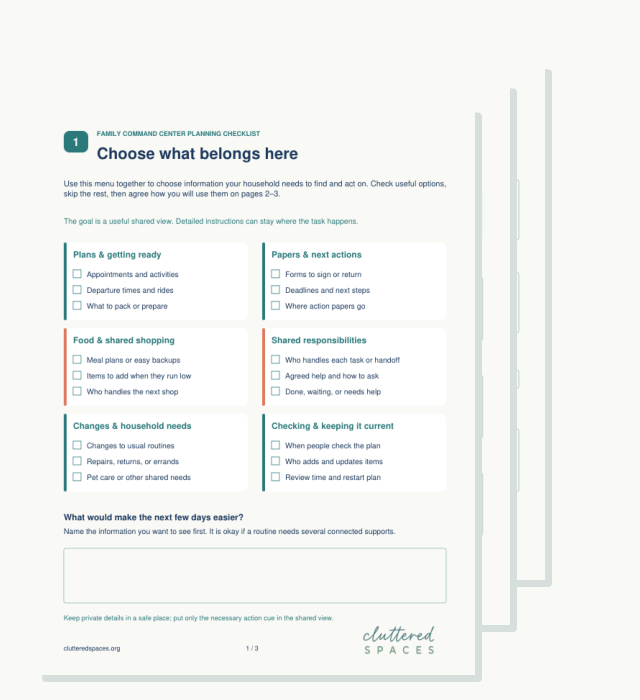
If you’re wondering what belongs in your setup, the three-page Family Command Center Planning Checklist gives you a menu to choose from. It is for households that want a shared plan without adding every possible chart and tracker.
On page 1, check the kinds of information your family needs to find. On pages 2–3, agree where the current plan lives, who updates it, when people check it, and what support helps. Choose a review date and leave room to note what you want to change. Printable and digital versions include a completed example and space for your own agreement.
For example, you might select departure times, preparation, and shared shopping. Your plan could say: “We check after dinner. Each adult adds their own changes; Jordan adds school dates with Sam when needed.” Use as many connected supports as the routine needs.
Get the printable and digital planning checklist by email, then choose the sections your household needs.
How to set up a family command center people will use
Choose the location and format together
Walk through the routine you want to support. Where do people check tomorrow’s plans? Where do school papers land? Can everyone reach the board, read it, or access the digital list? A blank wall is only useful if people encounter it when they need the information.
Paper can keep plans visible without opening an app. Digital tools can make updates available away from home. A combination can work, provided you agree where the current information lives. For example, keep the full schedule digitally and display only tomorrow’s departures on the fridge. Decide who updates that summary so copying it does not quietly become another person’s job.
Make the next action clear
“School stuff” requires someone to work out what it means. “Put the signed trip form in your backpack after dinner” gives the person a beginning and an outcome. For a calendar entry, include preparation when it matters: “Leave at 4:10; gather shoes and equipment at 3:55.”
If the form needs signing before it can be packed, show that handoff too. The reminder will be more useful when the step before it has already happened.
Give checking the board a place in the day
Agree on a moment that already happens: after breakfast, when bags are unpacked, or before everyone leaves the dinner table. At first, checking together may be useful practice. You might ask, “What do you need for tomorrow?” and help the person use the board to find the answer.
An alarm, a picture cue, or a note beside the backpack may help someone remember to check. Choose the support with them. “It’s on the board” is only helpful when the person can find, understand, and act on what is there.
A simple family command center example
Here’s what a few entries might look like in a household with two adults and a teen. Use the details you need; a status update is useful only if it helps people know what happens next.
Tuesday practice: leave at 4:10
Who does what next: Jordan gathers gear at 3:55. Alex drives.
Current status: Ride confirmed.
School form due Friday
Who does what next: Sam signs it at Thursday’s check-in; Jordan packs and returns it.
Current status: Needs signature.
Low shampoo and lunch bread
Who does what next: Anyone adds low items to the list. Sam handles Thursday’s shop.
Current status: On the shopping list.
Repair visit Wednesday, 9–11
Who does what next: Alex confirms access and clears the area Tuesday evening.
Current status: Visit confirmed.
The supplies and detailed instructions can stay where the work happens. This shared view holds the plan, the next handoff, and enough information to avoid guessing.
Share ownership of the information and the work
There’s a difference between completing a task and managing everything around it. Household research describes less visible work such as anticipating needs, considering options, deciding what to do, and checking the outcome.
A board can display that work, but it cannot negotiate who carries it. Agree on who adds information, who acts, who updates the status, and what support is available. Otherwise, the same person may remain responsible for noticing, writing, reminding, and checking—now with markers.
For shopping, someone who notices low shampoo can add it directly to the household list. The shopping trip may still be shared; adding the item should not require finding the person who usually remembers everything.
Keep responsibilities realistic for age, skills, access, and current capacity. A child can participate without being responsible for running the household. An adult can own a task while using reminders or agreed help. Support does not need to disappear for ownership to count.
Who keeps the command center current?
Make updating part of the agreement. In one household, each adult adds their own appointments and task owners update their next actions. A teen adds school dates alongside a parent during the evening check-in. Younger children might point to a picture or bring a paper while an adult records it.
Then choose who starts the shared review and removes outdated information. It can be a chosen role or a rotation, depending on what your household can manage. For example, Alex opens the Sunday review this month; Sam takes the next month. That person brings everyone together, rather than collecting every update alone. Check whether the role is workable and reasonably shared.
An adult example: owning a repair appointment
Suppose Alex agrees to coordinate a washing-machine repair. Alex contacts the repair company, adds the visit window, checks whether someone can be home, and records any preparation needed. Sam agrees to be there during the visit. Alex follows up afterward about the result and any next step.
Sam’s help is part of the plan; Alex still coordinates the appointment. If Alex needs support making the call, they can arrange that too. The agreement makes the work visible without requiring either person to do every part alone.
For the fuller conversation about roles and fairness, read sharing household responsibilities in a neurodivergent family.
An example: getting a permission slip back to school
Imagine the teen brings a form to the after-dinner check-in. The parent signs it, and the teen puts it straight into the backpack pocket used for school papers. The board says, “Return trip form Friday.” That may be enough for this family.
If forms get lost before the check-in, add a labeled holder where the bag is unpacked. If signed forms reach school but stay in the backpack, agree on a reminder to hand them in. Add support where the sequence actually stops; you do not have to build a tracking system for every step.
When a form is missed, ask what happened. Was it still waiting for a signature? Did the check-in happen after the bag was packed? Did the teen need help remembering the handoff at school? Those answers give you something useful to change.
If your family command center gets ignored
Before adding more reminders, ask what makes it hard to use. Too much information? Small writing? A location people pass only after leaving? An app someone cannot access? A task that feels too vague or needs help to begin?
If someone doesn’t want to use it, ask what feels unhelpful or unfair. Agree on what they will take responsibility for and how they will keep others informed. A board can make the plan easier to find; it cannot settle a disagreement about who does the work.
Ask each person what would make checking easier. Use readable labels alongside any colors. Pictures may help some readers; others may prefer a short written list. Keep personal or sensitive information somewhere private, with only the necessary action cue in the shared view.
Keep a smaller version for difficult weeks
When someone is ill or the week becomes unusually demanding, you might keep tomorrow’s departure times, essential preparation, and urgent deadlines in the active view. Meal planning can become “use the freezer dinner,” while optional chore tracking waits. Keep support for health, safety, and basic needs in place.
Make asking for help specific: “I can’t make the repair call today. Can you take over contacting the company and updating the board?” Confirm who is taking that responsibility and when. A note saying “needs help” is a beginning, but the handoff is not complete until someone agrees.
At the next agreed review, decide what to resume and whether any responsibilities need to change. Our guide to restarting household routines offers more ways to find a return point.
Common family command center questions
Can a family command center help with ADHD?
A visible next step may help with remembering and starting. Some people also need help breaking down the task, gathering supplies, or beginning alongside someone. Choose supports based on where the task gets hard for that person.
Do we need a digital family command center?
Choose the format people can access and maintain. Try existing supplies or tools before buying a device. The test is whether your family can find current information and use it with reasonable effort.
How will we know whether it is helping?
After a trial week, ask whether people found current information, prepared more easily, and knew their next steps. Also ask who carried the updating and reminding. A tidy board that leaves the same person doing all the coordination needs a different agreement. A week is a useful review window, not a deadline for learning the routine.
Your first version can be modest. Choose a recurring coordination problem, trace the steps, and decide which information belongs in the shared view. That routine may need several connected supports. The useful result is a household that knows where to look and how to participate.
Use the Family Command Center Planning Checklist to capture what your household wants to see and how you will keep it useful. You can print and write or complete the digital version. You can also make the same agreement on ordinary paper; the useful part is deciding together.
Give your household somewhere to find the plan.
Choose the information your family needs, agree who keeps it current, and make a plan you can return to together.
Get the three-page Family Command Center Planning Checklist in printable and digital PDF formats by email.
By requesting this checklist, you’re also signing up for Cluttered Spaces emails. You can unsubscribe anytime.

Suggested next step
If plans keep getting lost between the calendar, the counter, and the actual routine, Executive Function Coaching applied in your home can help you work through those handoffs, arrange practical supports, and practice using them together.
References
These sources explain executive function, cognitive offloading, and the less visible work of household planning. The command-center examples are practical applications of those ideas, rather than a tested treatment for ADHD or family conflict.
Diamond, A. (2013). Executive functions. Annual Review of Psychology, 64, 135–168.
Risko, E. F., & Gilbert, S. J. (2016). Cognitive offloading. Trends in Cognitive Sciences, 20(9), 676–688.
Daminger, A. (2019). The cognitive dimension of household labor. American Sociological Review, 84(4), 609–633.